What were the most commonly used passwords of 2025?
When it comes to passwords, I’ve made almost every mistake you can make – reusing them, making them too few characters, using personal information, keeping a master list of passwords in a notepad, etc. While some of these bad password habits are riskier than others, it’s always wise to check in with yourself, especially at the end of the year, to revisit your password hygiene practices and fix any that need correcting before the new year.
And it’s easy to get started with a password check-in because you can simply learn from others’ mistakes. Taking the time to review the list of the most common passwords of 2025 will give you a good baseline for what not to do. Check out the most commonly used passwords below and ask yourself, “Am I using any of them across my accounts?”
The Most Common Passwords of 2025
Drum roll, please! Of all the countries in the world, the most commonly used password in 2025 was 123456, with admin in second place and 12345678 in third. And in the United States, the most common password was admin, followed by password and 123456. For comparison, the top ten most common passwords in the United States and all countries are listed below.
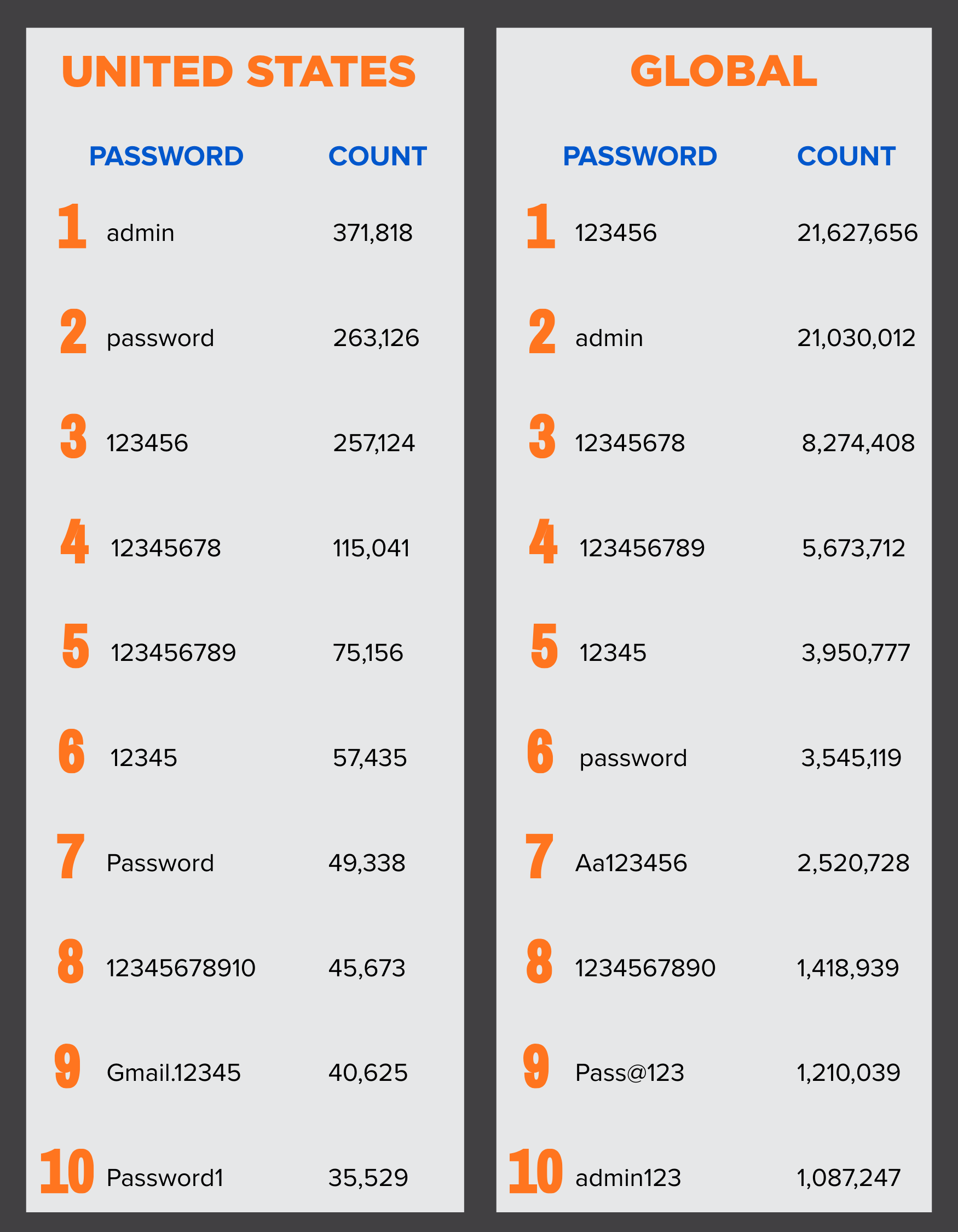
Is One of Your Passwords on the List?
Even if you don’t use any of the most commonly used passwords, chances are your loved ones and/or people within your organization are using some of them. Here are some helpful tips from our team on keeping your passwords secure… and off these lists in the future.
1. Create Lengthy, Unique Passwords
All your passwords should be at least 12-16 characters long and contain a combination of lower- and upper-case letters, numbers and symbols. Considering six of the most commonly used passwords across the globe are just a list of numbers in sequential order, it’s critically important to randomize your passwords so that they don’t contain any easily recognizable patterns.
2. Always Enable Multi-Factor Authentication (MFA)
Even if you have strong passwords across the board, enable multi-factor authentication whenever possible. MFA is commonplace at most organizations nowadays, but it might not be standard practice for your personal accounts. Whether it’s for your bank, Disney+ or LinkedIn accounts, if MFA is an option, use it. The requirement of a secondary verification not only helps protect against unauthorized access, but it can also act as an alert that a breach is being attempted using compromised passwords.
3. Opt for Passwordless Authentication When Possible
The reality is that even strong passwords and MFA aren’t enough to fully protect you or your organization against threat actors anymore. As we head into 2026, we are going to see more passwords being replaced by passwordless solutions that are more secure and save users valuable time during the authentication process.
At the organizational level, solutions like Windows Hello for Business and Microsoft Authenticator Passwordless are changing the game because they are designed to be phishing-resistant. These technologies turn employees’ faces, fingerprints or PINs into cryptographic keys that are nearly impossible for attackers to intercept or replicate.
On a personal level, passkeys are becoming more widely available across key accounts like Microsoft, Apple and Google. Passkey technology is typically more secure and allows users to confirm who they are without remembering passwords. Passkeys typically use some form of biometric authentication, e.g.,your fingerprint or face, or a PIN to grant you access to your account.
4. Use a Password Manager
I used to think password management software was too expensive and unnecessary. I’ve changed my mind. Only having to remember one master password? Sign me up! Password managers allow you to create new, strong and unique credentials across all your accounts on the web. Plus, some of them have extremely helpful features such as generating and storing passkeys for your accounts and letting you know which passwords you have that are weak, reused or have shown up in a recent data breach. Password managers are a great way to simplify strong password habits, but they’re only as secure as your master password. If that password is weak, all your accounts become vulnerable, so it is especially important to invest the time to design a strong one.
Following these security tips and avoiding the most commonly used passwords should put you on a solid password hygiene track for 2026. Remember that 94% of data breaches involve compromised credentials, so it’s crucial to make sure your login credentials are up to snuff.
If you have any questions about how to strengthen your password policies or if you’re concerned your organization’s credentials are vulnerable, feel free to contact our team at [email protected].
About Schneider Downs Cybersecurity
The Schneider Downs cybersecurity practice consists of experts offering a comprehensive set of information technology security services, including penetration testing, intrusion prevention/detection review, ransomware security, vulnerability assessments and a robust digital forensics and incident response team. In addition, our Digital Forensics and Incident Response teams are available 24x7x365 at 1-800-993-8937 if you suspect or are experiencing a network incident of any kind.
To learn more, visit our dedicated Cybersecurity page.
Want to be in the know? Subscribe to our bi-weekly newsletter, Focus on Cybersecurity.